Shared inbox
Urgent work looks like every other message.
- Hold sits beside routine mail
- Context stays in the thread
- Someone has to dig before acting

Operational email OS
Built now for logistics teams · Other industries welcome
InboxOS turns inbound freight email into structured, prioritised work. You choose which low-risk workflows may auto-advance; uncertain and high-impact work stays with people.
Fast enough for operators. Clear enough for review.

The idea
A chatbot helps a person answer email. InboxOS helps an organisation finish the work the email is about.
Email is the front door. Completed work is the product. That is controlled autonomy: you decide which workflows may advance automatically, while every external reply stays under your authority.
Say it in one line Chatbots answer mail. InboxOS completes the work.
Before and after
One familiar freight exception. Left: buried in the shared inbox. Right: raised as work, with a draft waiting for a person.
Urgent work looks like every other message.
The same hold rises as owned work.
Noise becomes owned work. A person stays on every customer send.
Attention where it counts
InboxOS separates noise from the signals and actions that need you, matched to your level in the organisation. Priority goes to moments that affect customers, risk and service levels.
Noise falls back
Duplicates, newsletters, spam, irrelevant promotions and automated notifications stay out of the work queue that needs a person.
Customer signals rise
Customs holds, missing documents, customer dissatisfaction, SLA risk, blocked approvals, escalations and silence where action was expected.
By your level
The product
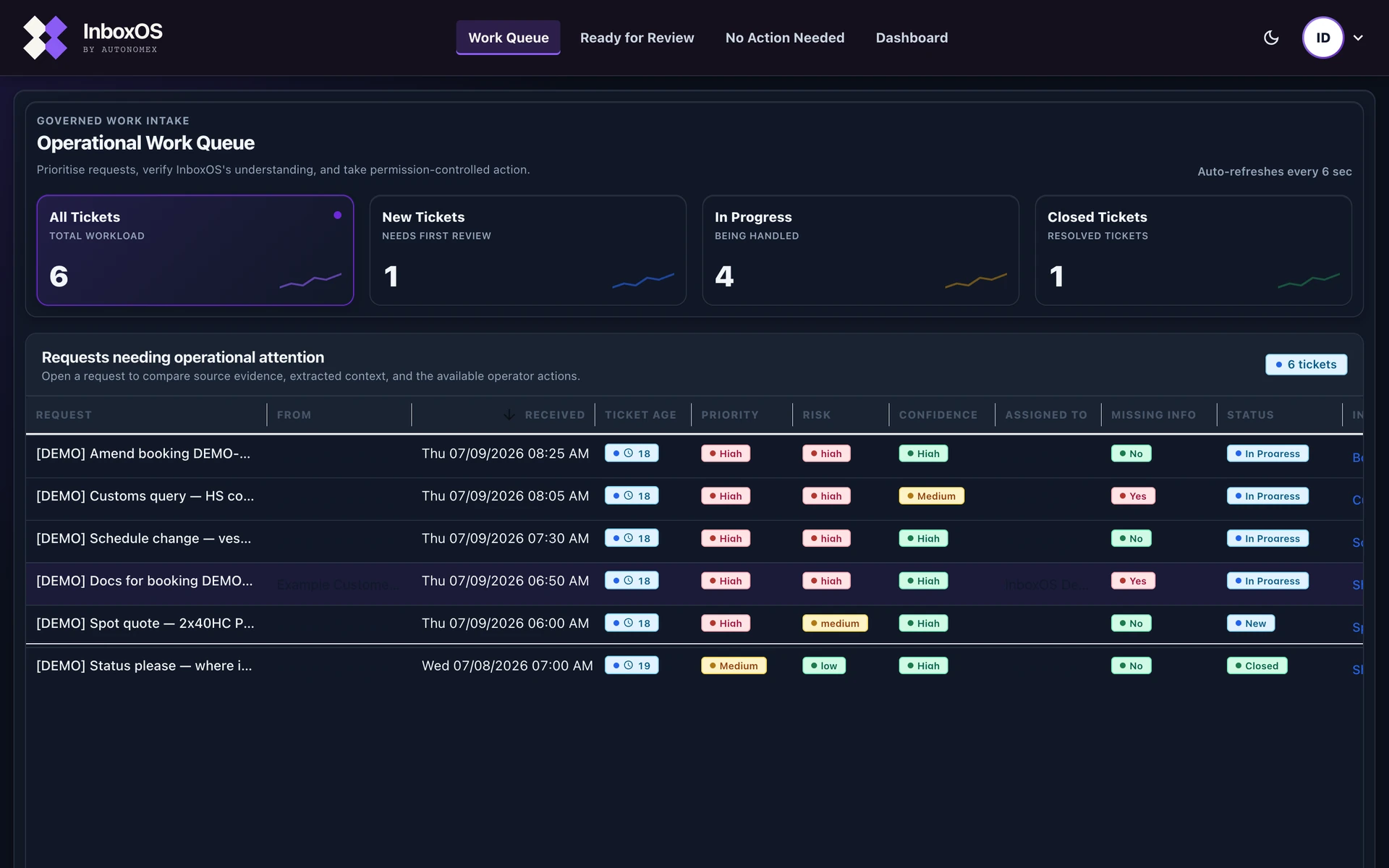
Real views from the current offline demo on sample logistics records. A private walkthrough shows the queue, ticket and review path on sample data.
Product demo · about 95 seconds
Walkthrough of the offline demo on sample logistics records.


See what needs attention
Customer signals rise. Noise falls back. Priority and risk come from pack rules, tone and follow-up, so the team starts with context.
Open the work
Fields, gaps and a ready-to-review reply sit together so judgment goes where it matters.
Explain what happened
When operations, auditors or a handover asks why, the record is already there.
What changes
Faster first attention, clearer ownership and governed replies. Outcomes the team can feel.
Noise and promotions fall back. Customer signals and the actions that need you rise first, by role, so judgment starts on work that moves customers and risk.
Priority rises from pack rules, tone and urgency, and follow-up signals. High-impact work surfaces while there is still time to act.
Drafts wait for a person to decide. You keep speed without giving up authority.
Clear history for operations, checks and handovers. Trust grows when you can look back and show the path.
Also in the product: one queue for bookings, quotes, holds, updates and invoice questions · words freight teams already use · a private sample demo before any real inbox.
Why InboxOS
Others help you write faster. InboxOS helps the organisation complete the job the message represents, with your people still in charge.
AI email responders
Usual fit
Fast drafts from a prompt or a short summary of the thread.
InboxOS
Clear work: what the email is about, what is missing, how urgent it is, and a draft waiting for a person to approve.
Outlook or Gmail with AI
Usual fit
Personal help inside the inbox you already use every day.
InboxOS
A work queue that sits beside Outlook or Gmail. Urgent holds rise as owned work with priority, risk and review state.
Shared inbox tools
Usual fit
Team sorting of conversations and who owns the reply.
InboxOS
Words freight teams already use, time-critical holds, and a path you can look back on when someone asks why.
Build-it-yourself automation
Usual fit
Connecting tools with rules someone has to build and keep running.
InboxOS
It already understands freight work, with people still in the path when commitment is made.
Buyer’s field guide
Use the category that matches the work you need to change. InboxOS is for operational email that must become owned, reviewable work.
| What matters | Shared inbox | Helpdesk | Chatbot / agent | InboxOS |
|---|---|---|---|---|
| Primary job | Assign conversations | Manage support tickets | Answer or draft | Finish operational work |
| Understands freight work | Manual setup | Generic taxonomy | Prompt dependent | Built into the workflow |
| Missing fields + risk | Team checks | Rules and forms | Varies by prompt | Surfaced with the ticket |
| Approval before send | Possible | Possible | Not the control plane | Required by design |
| Reconstructable path | Conversation history | Ticket history | Model transcript | Work + review trail |
They help you write faster. We help your team finish the job with control still in your hands.
Trust
You choose the eligible workflows, autonomy thresholds and review boundaries. Routine low-risk work may auto-advance; uncertain, high-impact and outbound actions stay visibly under human control.
Questions buyers ask first
Yes. You set the autonomy dial. Choose which workflows are eligible and set the confidence and risk thresholds. Routine low-risk work may auto-advance; uncertain and high-impact work stays in human review. Autonomous Queue is optional and can be switched off where regional policy or your preference requires it.
Yes. If regional policy does not allow autonomous advancement, or your organisation prefers fully human-reviewed progression, Autonomous Queue can be disabled. Classification, extraction, drafting and human approval before send remain available.
Start light, then grow on the same core. Discovery begins with a past-mail sample you choose; your live inbox password stays with you and there is no hard cutover of the tools your team already uses. Your industry pack carries how work is judged. As evidence builds, we refine those rules with you and open more workflow types without replacing InboxOS.
Confidence at least 7 and low intent risk. That is the shipping default for work that may advance without manual handling. You can tighten or open those thresholds, or switch Autonomous Queue off. Autonomous means internal routing, not unsupervised customer send.
From pack rules plus live signals. Priority rises when the industry pack marks the request as high priority, when tone and urgency look strained, or when the thread looks like a follow-up. Separately, intent risk comes from the pack rules for that request type.
Human approval is required. A person must approve every reply that reaches a customer before it sends.
One organisation, one setup. Your deployment stays dedicated to your company.
Sample first, then your history. The private demo uses offline sample mail for invited people. Discovery uses a past-mail sample you choose, while your live password stays with you.
Yes. Work leaves a step-by-step trail operations and auditors can follow when someone asks why.
Your people. Review stays under roles you control. Help moves work forward; authority stays with your team.
Contract-specific claims. The Security Overview states current posture. SOC 2 or ISO appear only when a contract includes them.
Where data stays
Configurable autonomy
Autonomous Queue is optional and can be switched off where regional policy or your preference requires every item to stay in human review.
Need something to share with security or leadership? Open the public security overview Request the detailed pack
Documents
Security Overview first for most buyers, plus capability and executive packs for leadership. Ask with your demo note and we will send it.
Insights
Practical reading on freight teams, governed automation and honest capacity sizing. Share with IT and finance when the conversation gets serious.
Treat the inbox as intake, not the system of record.
ReadWhy approval before send is the control plane.
ReadWhat real digitisation changes on day one.
ReadA buyer checklist that survives internal review.
ReadRanges and assumptions instead of one invented percentage.
ReadBuilt for freight
Container yards, uplift windows and the long haul on asphalt. InboxOS is built for the inbound mail that moves work across these modes.

Scroll · the lanes open
Who we serve
Right now our focus is freight and logistics: bookings, quotes, customs holds, status updates and invoice questions. That is the operation we are designing for and demonstrating today.
If you run operations in wealth management, hotels, insurance, or another email-heavy operation, we still want to hear from you. Reach out. Tell us your inbox. We will say honestly whether InboxOS is a fit now or later.
Register interest in your industryFrom the founder
AI that writes is becoming common. Trusted action is still rare. InboxOS exists so freight teams can move faster without giving up the judgment that protects customers and the company.
Banking data
Large-scale customer and transaction work made one lesson clear: intelligence matters only when people can act on it responsibly.
Enterprise controls
Banking, compliance and consulting shaped the insistence on approval boundaries, traceability and explainable operations.
AI systems
InboxOS brings workflow intelligence, agent orchestration and human judgment together at the moment work moves.
Begin
We size the work from your mail and your labour costs. Then you prove one workflow, choose its autonomy and review boundaries, and expand only when the evidence and your team are ready.
What we use
What is actually in the inbox: how much mail, what kinds, and the work that matters.
Time and labour numbers from operations and finance. You bring the numbers.
What you get
Hours you can size from labour inputs, framed next to visibility, control, exception handling and auditability. Discovery grounds the labour slice in your sample.
How you buy
This page and a private sample demo.
Your data Offline sample walkthrough on demo records.
Easy to begin: a past-mail sample you choose. No hard cutover. Capacity sized from your composition and labour costs.
Your data Historical sample you choose. Live password stays with you.
One type of work, locked for the trial. Review boundaries stay under your control.
Your data Real inbox you allow, after a safe test first.
Ongoing use when the team is ready.
Your data Your own private setup we run for you, or in your cloud when you are ready for production.
Discovery sizes the labour range on your sample. InboxOS measures recovered capacity in live use. Service, risk and control outcomes are judged in pilot evidence. Fees follow that conversation.
One measurable slice
Use the calculator for released capacity only. The fuller return is digitising inbound work into a governed operating rhythm: visibility, control, speed on exceptions and a path you can defend.
Expected labour capacity released
- FTE
A labour proxy from your inputs. It does not price risk avoided, service lift or operating control.
Annual labour value of that capacity
-
Before platform fees. One cost lens only: avoided hiring, overtime, contractors or room for higher throughput.
First step
Private sample demo on logistics mail, offline. Name your industry in the form if you are outside freight.
Demo access
We copied the details to your clipboard. Send them to the AutonomeX team, or open your email app below.
